Roadmap guidelines
A roadmap is an essential tool to make sure contributors and maintainers align their efforts to the collective needs of the community. It is also a requirement for incubating projects. Meanwhile, adhering to the roadmap is a requirement for graduation.
Roadmap meeting
To give all users and contributors a chance to shape the roadmap, maintainers must agree on a time and date to meet and discuss the roadmap exclusively. This may be done on a bi-weekly community call, or at another convenient time ensuring the highest possible attendance of participating firms.
During this meeting, each firm gets 5-10 minutes to discuss their most wanted features and improvements, in order of priority. Each firm's highest priority item will be given additional weight in the roadmap. Meeting participants are encouraged to document their requirements by commenting on the meeting issue.
After the meeting is over, an AI meeting summary will be generated and sent to maintainers via email. These meeting minutes may be incomplete or inaccurate, it's critical that firms leave a comment with their requirements (or otherwise, the maintainer in charge of handling meeting minutes writes them down herself).
Once the meeting minutes and meeting issue comments are ready, a maintainer can use the following template to create the roadmap (either manually or with AI assistance). If using AI, one must not forget to include all the relevant context (meeting minutes, meeting issue, roadmap template, and any additional context provided by participants).
Roadmap meeting and issue templates
These are some sample templates for the roadmap meeting minutes and roadmap issue itself. Feel free to adapt them to the project's rules.
In order to make use of these, add them as .md files into your .github/ISSUE_TEMPLATE directory. You'll be able to see them when creating a new issue.
Roadmap meeting template
.github/ISSUE_TEMPLATE/roadmap_meeting_minutes.md:
---
name: "\U0001F91D {{PROJECT_NAME}} Roadmap Meeting Minutes"
about: To track {{PROJECT_NAME}} roadmap meeting agenda and attendance
title: DD MMM YYYY - {{PROJECT_NAME}} Roadmap Meeting Minutes
labels: meeting
assignees:
---

## Date

YYYYMMDD - time

## Meeting info

- [Meeting link](https://zoom-lfx.platform.linuxfoundation.org/meeting/95849833904?password=99413314-d03a-4b1c-b682-1ede2c399595)

- [Register for future meetings](https://zoom-lfx.platform.linuxfoundation.org/meeting/95849833904?password=99413314-d03a-4b1c-b682-1ede2c399595&invite=true)

## Meeting notices

- FINOS **Project leads** are responsible for observing the FINOS guidelines for [running project meetings](https://community.finos.org/docs/governance/meeting-procedures/). Project maintainers can find additional resources in the [FINOS Maintainers Cheatsheet](https://community.finos.org/docs/finos-maintainers-cheatsheet).

- **All participants** in FINOS project meetings are subject to the [LF Antitrust Policy](https://www.linuxfoundation.org/antitrust-policy/), the [FINOS Community Code of Conduct](https://community.finos.org/docs/governance/code-of-conduct) and all other [FINOS policies](https://community.finos.org/docs/governance/#policies).

- FINOS meetings involve participation by industry competitors, and it is the intention of FINOS and the Linux Foundation to conduct all of its activities in accordance with applicable antitrust and competition laws. It is therefore extremely important that attendees adhere to meeting agendas, and be aware of, and not participate in, any activities that are prohibited under applicable US state, federal or foreign antitrust and competition laws. Please contact legal@finos.org with any questions.

- FINOS project meetings may be recorded for use solely by the FINOS team for administration purposes. In very limited instances, and with explicit approval, recordings may be made more widely available.

## Agenda

- [ ] Convene & roll call (5mins)
- [ ] Display [FINOS Antitrust Policy summary slide](https://community.finos.org/Compliance-Slides/Antitrust-Compliance-Slide.pdf) and review Meeting Notices (see above)
- [ ] Approve past meeting minutes
- [ ] Organization/user 1 desired features & improvements
- [ ] Organization/user 2 desired features & improvements
- [ ] ...
- [ ] Prioritization & Summary
- [ ] AOB, Q&A & Adjourn (5mins)

## Meeting Minutes

<!-- Add meeting minutes here, edit as appropriate -->

## Action Items

- [ ] Make roadmap issue from meeting minutes, comments and roadmap template
- [ ] Action 2
- [ ] ...
Roadmap issue template
The following roadmap template includes instructions at the top. These instructions must be removed before publishing the issue.
.github/ISSUE_TEMPLATE/roadmap.md:
---
name: Roadmap
about: Pinned roadmap issue built from a roadmap meeting and each organisation's ranked priorities
title: '{{PROJECT}} {{VERSION_OR_PERIOD}} Roadmap'
labels: ['roadmap']
assignees: []
---

<!--
=====================================================================
ROADMAP TEMPLATE — INSTRUCTIONS (delete this comment before posting)
Written for both humans and AI assistants. Follow the steps in order.
=====================================================================

INPUTS
  A. Roadmap meeting minutes (issue link) — the "Source".
  B. One RANKED priority list per participating organisation
     (usually posted as comments on the minutes issue).
  C. Existing open issues/PRs in the repo that match those priorities.
  D. The previous roadmap issue, if any.

STEP 1 — Build roadmap items
  - Merge asks from different orgs that describe the same deliverable.
  - Split asks that would ship separately (e.g. "user onboarding" vs
    "project onboarding" vs "fork management" are three items).
  - Name each item with a short noun phrase ("PostgreSQL backend",
    not "We should add Postgres support").

STEP 2 — Assign Tiers (based on demand). Count how many orgs raised each item:
  - Tier 1: raised by 3+ orgs
  - Tier 2: raised by 2 orgs, OR it was any single org's #1 priority
  - Tier 3: raised by a single org
  For projects with few participating orgs, Tier 1 may instead be
  "at least half of participating orgs (min. 2)". State the rule used
  in the Glossary. Never assign tiers by perceived importance alone.

STEP 3 — Assign Size (effort estimate)
  - 🟢 Easy win: a few days of work or less
  - 🟡 Medium: needs design or several PRs
  - 🔴 Large: cross-cutting, or likely to introduce breaking changes
  - N/A: non-code items (governance, process)

STEP 4 — Assign Status (from the linked issues/PRs)
  - ⚪ Not started: no issue exists yet
  - 🔵 Issue drafted: a tracking issue exists, no PR
  - 🟠 In progress: an open PR or active work exists
  - ✅ Done: merged/closed as completed
  Status emojis deliberately differ from Size emojis so the two
  columns can't be confused in the Overview table.

STEP 5 — Fill each item section
  - Owners: take from the minutes' action items. If none, write TBD.
  - Depends on / Enables / Blocks: item numbers only, omit if none.
  - Description: 1–2 sentences on the problem, not the solution.
  - Sub-issues/PRs: link real issues as "- [ ] #123" (GitHub renders
    the title). For work without an issue, write a short deliverable.
    NEVER invent issue or PR numbers.

STEP 6 — Fill the Overview table
  - One row per item, same numbering as the sections.
  - Link each item to its heading anchor. GitHub anchors are the
    heading text lowercased, punctuation removed (except hyphens),
    spaces replaced by hyphens. Examples:
      "### 2. Event hooks & notifications" -> #2-event-hooks--notifications
      "### 3. Security: zero known CVEs"   -> #3-security-zero-known-cves

STEP 7 — Publish
  - Number items continuously across tiers (1..N), Tier 1 first.
  - Remove unused example items and all {{PLACEHOLDERS}}.
  - Pin the new issue; unpin the previous roadmap and link it below.

RULES
  - Record which orgs RAISED an item only in the source minutes, not
    here: this roadmap lists demand tiers, not which companies want what.
    (FINOS meetings are subject to the LF Antitrust Policy.)
  - Keep wording neutral: "raised by", never "required/approved by".
  - Don't reorder within a tier by opinion; order by dependencies first,
    then by how highly orgs ranked the item.
=====================================================================
-->

# {{PROJECT}} {{VERSION_OR_PERIOD}} Roadmap

{{ONE_SENTENCE_OVERVIEW — e.g. "An overview of where {{PROJECT}} is headed and what the community wants."}} Previous issue #{{PREVIOUS_ROADMAP_ISSUE}}.

**Status:** {{Draft, to be reviewed in next Community call | Confirmed}}
**Last reviewed:** {{YYYY-MM-DD}}
**Next review:** {{YYYY-MM-DD}}
**Source:** {{DATE}} roadmap meeting minutes and comments (#{{MINUTES_ISSUE}})

## Glossary

Each item is classified according to importance, size and status. Maintainers update the status emoji as work progresses.

| Category   | Description                            | Values                                                                                                        |
| ---------- | -------------------------------------- | ------------------------------------------------------------------------------------------------------------- |
| Importance | How many organisations raised the item | Tier 1: raised by 3+ orgs, Tier 2: raised by 2 orgs (or an org's #1 priority), Tier 3: raised by a single org |
| Size       | Estimated effort                       | 🟢 Easy win, 🟡 Medium, 🔴 Large (or breaking), N/A (non-code)                                                |
| Status     | Development progress                   | ⚪ Not started, 🔵 Issue drafted, 🟠 In progress, 🟣 Ready for review, ✅ Done                                |

## Overview

|  #  | Item                                | Tier | Size | Status |
| :-: | ----------------------------------- | :--: | :--: | :----: |
|  1  | [{{ITEM_NAME}}](#1-{{item-anchor}}) |  1   |  🔴  |   🟠   |
|  2  | [{{ITEM_NAME}}](#2-{{item-anchor}}) |  2   |  🟡  |   🔵   |
|  3  | [{{ITEM_NAME}}](#3-{{item-anchor}}) |  3   |  🟢  |   ⚪   |

---

## Tier 1: high demand

### 1. {{ITEM_NAME}}

Size: {{🟢 | 🟡 | 🔴 | N/A}} | Owners: {{@handle, @handle | TBD}} | Blocks: {{item numbers}}

<!-- 1–2 sentences: what problem this solves and why it matters. Mention if other items depend on it. -->

#### Sub-issues/PRs

- [ ] #{{ISSUE_OR_PR}}
- [ ] {{Deliverable without an issue yet}}

---

## Tier 2: medium demand OR an organisation's top pick

### 2. {{ITEM_NAME}}

Size: {{🟢 | 🟡 | 🔴 | N/A}} | Owners: {{@handle | TBD}} | Depends on: {{item numbers}}

<!-- 1–2 sentences: what problem this solves. -->

#### Sub-issues/PRs

- [ ] #{{ISSUE_OR_PR}}
- [ ] {{Deliverable without an issue yet}}

---

## Tier 3: raised by a single organisation

### 3. {{ITEM_NAME}}

Size: {{🟢 | 🟡 | 🔴 | N/A}} | Owners: {{@handle | TBD}} | Enables: {{item numbers}}

#### Sub-issues/PRs

- [ ] {{Deliverable without an issue yet}}

---

### Adding your desired features

If you want to extend or modify this list with your organisation's priorities, please leave a comment with your desired features, ranked by importance. If a feature is requested by multiple organisations, it will be upgraded to the next tier.

### Picking up an issue

If you've started working on an issue, leave a comment here so maintainers can keep this roadmap up-to-date.

### Missing sub-issues

If any roadmap item is missing a sub-issue, open an issue for it and/or link it here.

### Updates/comments

This issue is reviewed at each roadmap meeting. Maintainers will update the tiers, status and sub-issues based on any comments posted.
Adhering to the roadmap
Roadmap adherence, is a requirement not just for graduation but also to maintain graduated status. Thus, we recommend holding regular roadmap meetings (at least once per quarter), to capture the community's evolving needs and ensure continuous alignment of the project's development efforts.
The roadmap template includes a "Next review" field to allow scheduling roadmap revisions. However, we encourage maintainers to pay attention and update the status of the roadmap issue as often as they consider appropriate (ideally, right after each bi-weekly community call).
Milestones and sub-issues
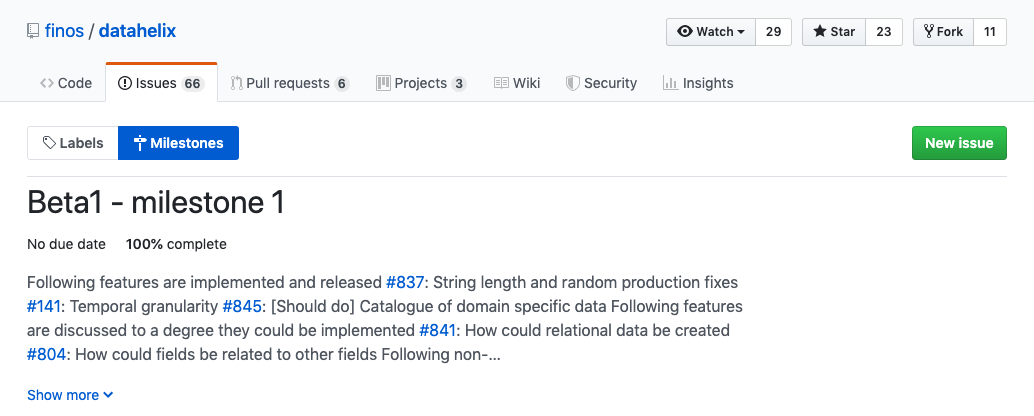
Each roadmap item can be divided into sub-issues representing the individual tasks required to fulfill its requirements.
Then, you can group each issue into Milestones to organize future releases. GitHub project boards let you display that as a Kanban board across a list of predefined states to track development:
Although it may seem redundant to maintain a project board along with the roadmap issue, remember that the roadmap is publicly accessible: it's a reference point for potential adopters, new contributors and long-time contributors alike.